
Last updated on
Nov 7, 2026
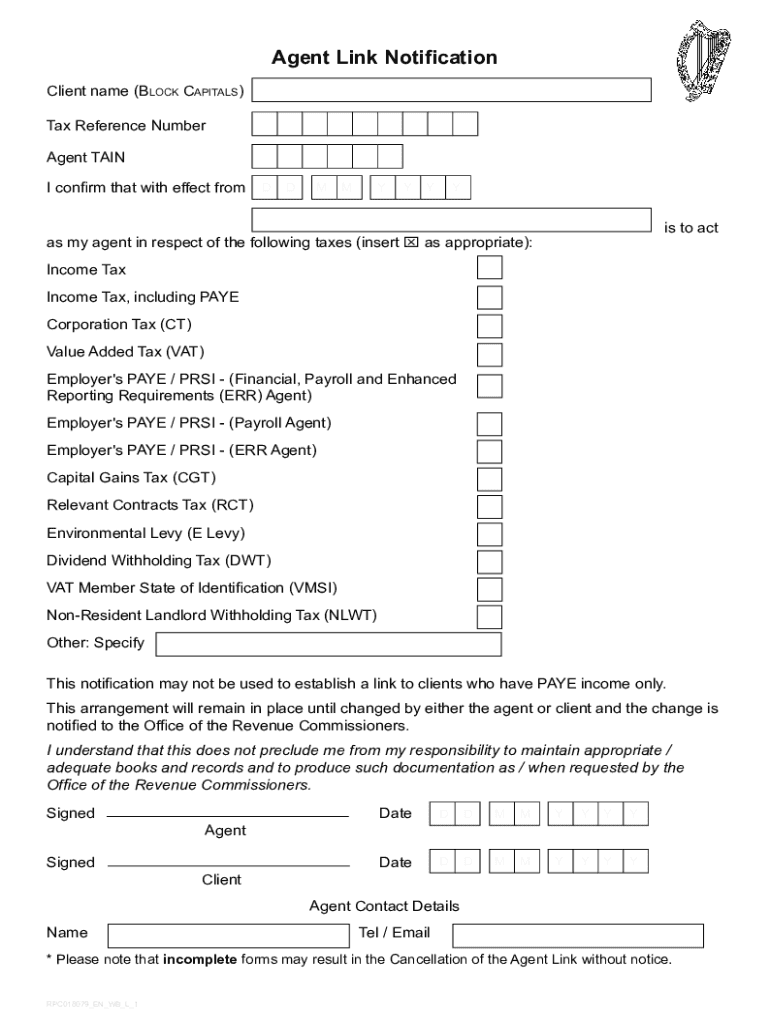
IE Agent Link Notification 2023-2026 free printable template
We are not affiliated with any brand or entity on this form

Fill out
Complete the form online in a simple drag-and-drop editor.

eSign
Add your legally binding signature or send the form for signing.

Share
Share the form via a link, letting anyone fill it out from any device.

Export
Download, print, email, or move the form to your cloud storage.
Why pdfFiller is the best tool for your documents and forms


End-to-end document management
From editing and signing to collaboration and tracking, pdfFiller has everything you need to get your documents done quickly and efficiently.
Accessible from anywhere
pdfFiller is fully cloud-based. This means you can edit, sign, and share documents from anywhere using your computer, smartphone, or tablet.
Secure and compliant
pdfFiller lets you securely manage documents following global laws like ESIGN, CCPA, and GDPR. It's also HIPAA and SOC 2 compliant.
What is IE Agent Link Notification
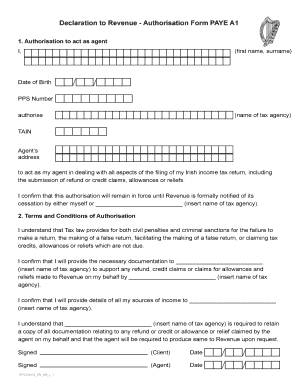
The Agent Link Notification Form is a tax authorization document used by clients in Ireland to grant an agent the authority to manage their tax matters.
pdfFiller scores top ratings on review platforms




Who needs IE Agent Link Notification?
Explore how professionals across industries use pdfFiller.

IE Agent Link Notification is needed by:
-
Clients seeking to authorize a tax agent.
-
Tax agents representing clients for tax issues.
-
Businesses requiring tax representation.
-
Individuals needing assistance with tax filings.
-
Financial consultants advising clients on tax matters.
Comprehensive Guide to IE Agent Link Notification
What is the Agent Link Notification Form?
The Agent Link Notification Form serves as a key document in Ireland for authorizing tax agents to act on behalf of clients in various tax-related matters. This important form defines the responsibilities of agents and clients and is utilized in accordance with the Office of the Revenue Commissioners.
Specifically, the Agent Link Notification Form allows clients to empower tax agents with formal authorization for tasks such as filing tax returns, liaising with the Revenue Commissioners, and managing tax payments. Understanding its function is essential for both parties involved to ensure compliance with tax regulations in Ireland.
Purpose and Benefits of the Agent Link Notification Form
The Agent Link Notification Form is necessary for smooth tax consultations and submissions. One of its primary benefits is that it enables agents to act on behalf of clients seamlessly, preventing misunderstandings regarding tax authorization.
Additionally, this form clarifies the legal responsibilities of both the client and the agent, helping to protect both parties during tax processes. Using the form mitigates miscommunication and provides a clear record of the authorization granted, which is advantageous in legal scenarios.
Who Needs the Agent Link Notification Form?
The target audience for the Agent Link Notification Form includes clients who require assistance with their tax matters and tax agents who need formal authorization to represent these clients. Clients benefit from this arrangement as it guarantees that their chosen agents have the requisite permissions to handle their tax files.
Situations that necessitate this form's use typically involve clients facing complex taxation issues or those wishing to delegate their tax-related tasks entirely to their agents. Recognizing who needs to utilize the form is crucial for effective tax management.
Key Features of the Agent Link Notification Form
This form contains several main features that facilitate its effective use. First, it has fillable fields where clients provide essential information such as client name, Tax Reference Number, and Agent TAIN.
Additionally, it includes signature lines for both parties and options for selecting the type of taxes the agent is authorized to address. The instructions for completing the form are clear and aimed at guiding users through the process without confusion.
How to Fill Out the Agent Link Notification Form Online (Step-by-Step)
Filling out the Agent Link Notification Form online can be done efficiently by following these step-by-step instructions:
-
Access the form using pdfFiller’s platform.
-
Enter the client name and Tax Reference Number in the designated fields.
-
Provide the Agent TAIN where required.
-
Select the types of taxes for which the agent is authorized.
-
Add signature lines for both the client and the agent.
-
Review the completed form for accuracy before submission.
Tips for avoiding common mistakes include double-checking the entered information and ensuring all required fields are filled in. Utilizing pdfFiller enhances convenience, allowing users to edit and complete the form digitally.
Submission Methods and Delivery for the Agent Link Notification Form
Once the Agent Link Notification Form has been completed, there are various methods available for submission. Users can submit the form online through secure channels provided by the Revenue Commissioners or opt for traditional mail.
To ensure timely submission, it is critical to follow the guidelines given by the Revenue Commissioners. Potential follow-up procedures may include checking the submission status and confirming receipt, particularly if mailed.
What Happens After You Submit the Agent Link Notification Form?
After submitting the Agent Link Notification Form, users can expect to receive confirmation regarding the submission details. This confirmation may include documentation or a reference number that allows clients and agents to track the status of their application.
The processing time for the form by the Office of the Revenue Commissioners should be monitored, as it varies based on the workload. Users can check their submission status online for updates regarding their form processing.
Security and Compliance for the Agent Link Notification Form
When submitting the Agent Link Notification Form, it is essential to understand the security measures in place to protect sensitive information. Data protection regulations such as GDPR and HIPAA guide how personal data should be treated.
pdfFiller implements robust security practices, including 256-bit encryption, ensuring the secure handling of documents during the submission process. Clients and agents must prioritize the security of their information throughout this process.
Sample or Example of a Completed Agent Link Notification Form
To assist in visualizing a correctly filled form, a sample completed Agent Link Notification Form is available. This example, whether as a screenshot or a downloadable PDF, provides practical reference material for users.
The sample includes annotations to highlight key sections and common entries, offering tips that guide proper completion based on real examples. By reviewing these annotations, users can better understand how to fill out their forms accurately.
Get Started Easily with pdfFiller
Utilizing pdfFiller to fill out and submit the Agent Link Notification Form offers a user-friendly approach. The platform provides numerous features for form filling and eSigning, emphasizing ease of use, security, and efficiency.
Encouraging users to take action now helps facilitate the process of filling out the form online quickly and accurately, ensuring that all legal requirements are met in a timely manner.
How to fill out the IE Agent Link Notification
-
1.Access pdfFiller and search for 'Agent Link Notification Form'. Open the document in a new tab.
-
2.Navigate through the form using the page scrollbar or arrow keys to view the entire document.
-
3.Before filling out the form, gather all necessary details, including the client's name, tax reference number, and agent's TAIN to ensure accuracy.
-
4.Click on the field for 'Client name' and type the full name of the client as registered with the Revenue Commissioners.
-
5.Next, locate the 'Tax Reference Number' input box and enter the client's unique tax reference number.
-
6.Find the section marked 'Agent TAIN' and input the Tax Agent Identification Number associated with the agent.
-
7.Review each field to ensure that all information is correct and complete.
-
8.Check the boxes next to the types of taxes that the agent is authorized to manage. Ensure all relevant areas are selected.
-
9.Look for the signature lines and click to add electronic signatures for both the agent and the client.
-
10.After filling in all fields, review the form again to verify that no information is missed or incorrect.
-
11.Once verified, click the 'Save' button to store the completed form on pdfFiller.
-
12.You can also download the filled form by clicking on the 'Download' option. Choose your preferred file format.
-
13.To submit the form, select the 'Submit' option and follow any additional instructions provided by pdfFiller for successful submission.

Who is eligible to use the Agent Link Notification Form?
Any client in Ireland wishing to authorize a tax agent to manage their tax-related matters can use the Agent Link Notification Form.
Are there any deadlines for submitting this form?
There are typically no strict deadlines for submitting the Agent Link Notification Form, but it should be completed promptly to ensure the agent can handle tax matters without delays.
What are the methods for submitting the completed form?
The completed Agent Link Notification Form can be submitted electronically through pdfFiller or printed and mailed to the Office of the Revenue Commissioners, depending on the preferred method.
Is notarization required for this form?
No, the Agent Link Notification Form does not require notarization before submission as per the current regulations in Ireland.
What common mistakes should I avoid when filling out this form?
Ensure that all fields are filled accurately, especially the tax reference number and TAIN. Omitting signatures or incorrect selections can delay processing.
How long does it take for the form to be processed?
Processing times for the Agent Link Notification Form can vary, but it generally takes a few weeks for the Office of the Revenue Commissioners to process and notify the involved parties.
What supporting documents are needed with this form?
Typically, no additional supporting documents are needed with the Agent Link Notification Form unless specified by the Office of the Revenue Commissioners.
IE Agent Link Notification Form Versions
Related Content
Related Forms




Get the latest insights from our blog


If you believe that this page should be taken down, please follow our DMCA take down process
here
.
This form may include fields for payment information. Data entered in these fields is not covered by PCI DSS compliance.